Earlier today, my coworker walked into the office and mentioned something about needing to install Python. My brain immediately latched on.
I spun around and started interrogating him — why Python? What’s the problem? What needs fixing? We went back and forth for a bit. I wanted him to understand there are plenty of ways to skin this cat, but the most important thing first is to understand how the end-users will actually interact with whatever gets built. Get that part wrong and nothing else matters.
Once I felt like I had a solid enough picture of the problem, I told him I could build him an app that solves exactly what he needed in about 15 minutes.
He looked at me like I had grown a third ear on my forehead.
So I said, “Fine. Let me show you.”
I’ll be honest — I’ve been putting in serious time lately getting well acquainted with coding agents. GitHub Copilot, Claude Code, the VS Code extensions, all of it. Studying optimization techniques, efficient workflows, how to build reusable skills to speed up repetitive tasks, how to use Git and platforms like GitHub and GitLab to host projects. The whole pipeline.
I was ready for game time.
Start the clock: 10:44
Created a folder, set it as the working directory:
mkdir ~\newproject
cd ~\newproject
Initialized git:
git init
Opened VS Code:
code .
Once VS Code loaded with an empty workspace, I jumped into Claude Code and started describing the project. My prompt looked something like this:
this is a new csharp .net project,

use wpf
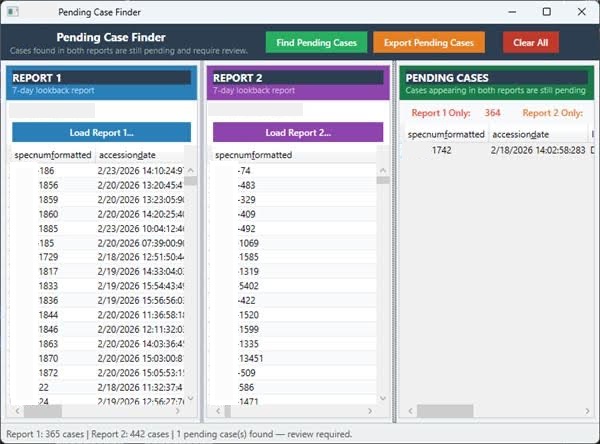
form should be split into three panels
left = old data
middle = new data
right = comparison
old and new data both have the same column1 named "seq_number"

if a "seq_number" is found in both old and new data sets,
its a finding and record should be highlighted in right panel

also users should be able to drag and drop the csv files into this gui
alternatively, they can click a button to invoke a file picker.

present your plan for approval
Claude 4.6 took a few minutes to think through a plan. It looked solid, so I approved it and told the agent to proceed. We went back and forth a few times to refine some constraints and tweak a few features.
By 11:10, we were already on our second successful build of an .exe that we could realistically hand off and deploy. It could still use some work to output specific columns in the comparison panel, but the app satisfies 95% of the original requirements.
Now — the lesson here isn’t that AI agents are coming for our jobs.
The real lesson is what’s possible when a human who understands the problem works alongside an agent that knows how to build. That combination moves fast. Faster than I expected, honestly, and I was the one who made the bet.
Here’s what the final app looks like:
What about my coworker? What did he think?
His first reaction: “No, that’s amazing… but honestly this is all a bit over my head.”
Then, as I was leaving for the day, he stopped me — “Hey, by the way, you never gave me the executable file.”