What is this?
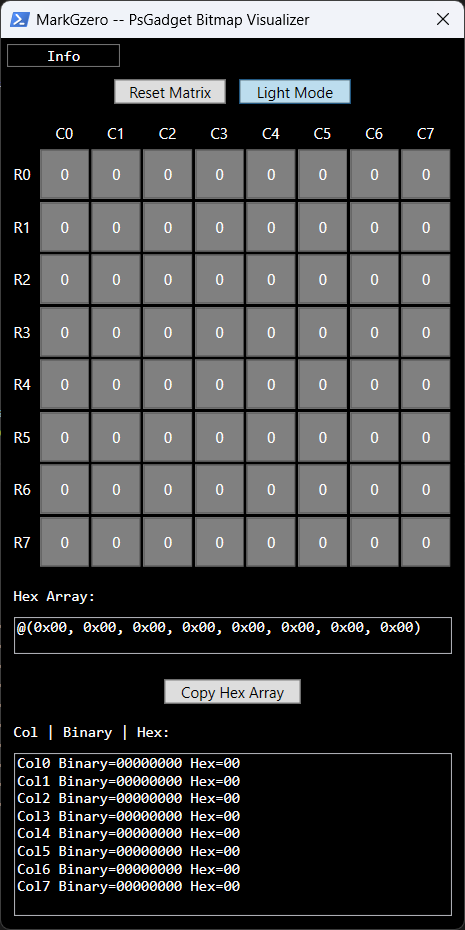
This tool provides a simple GUI for editing an 8x8 pixel bitmap, ideal for generating data for LED matrix displays such as the SSD1306. As you toggle grid cells, corresponding binary and hexadecimal values update in real-time.
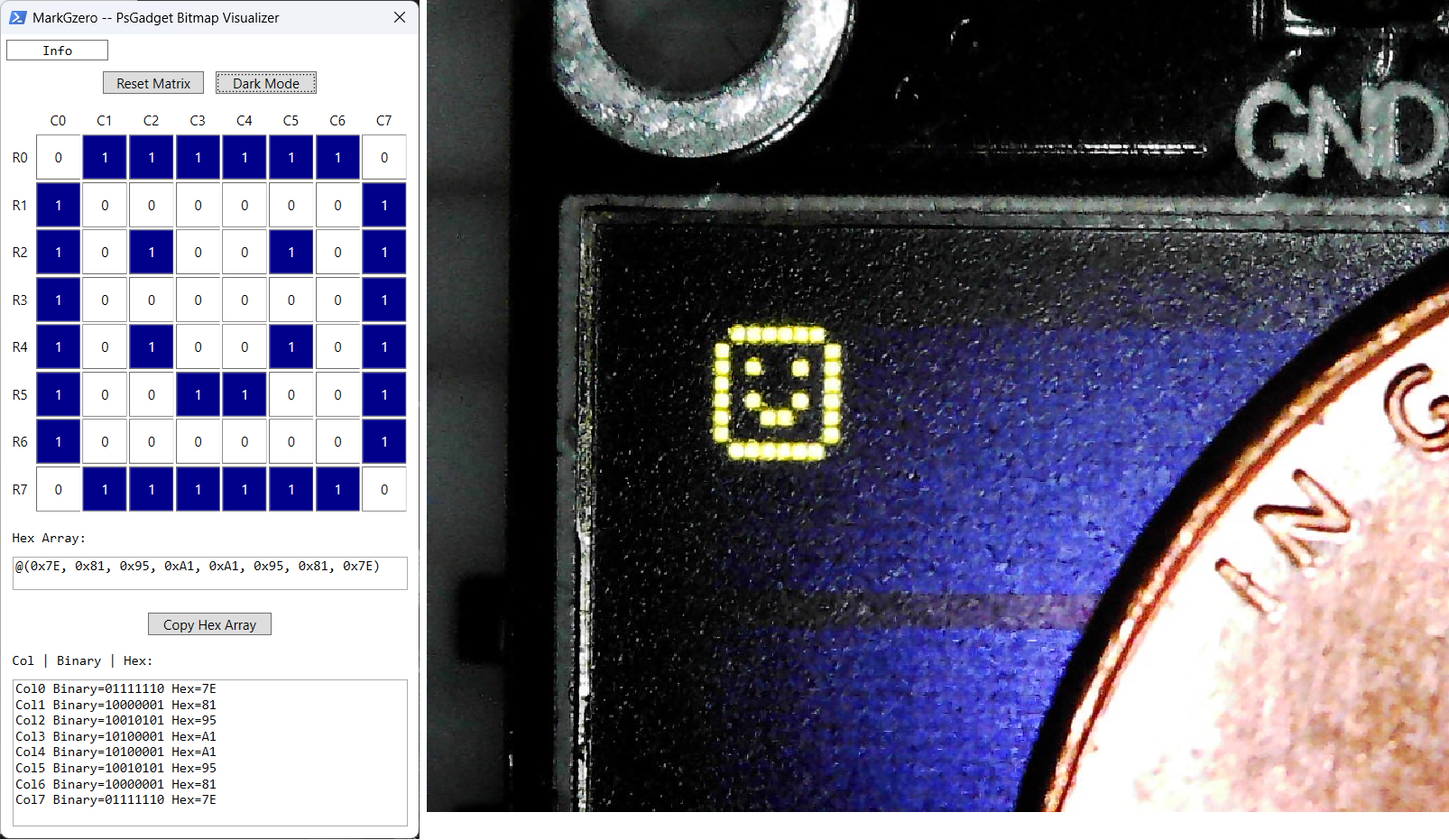
The top-left corner represents (Row 0, Column 0). Each column is read top-down, with the least significant bit at the top — equivalent to rotating the column’s binary value 90° counter-clockwise.
Usage
• Click on a grid cell to toggle between “On” (1) and “Off” (0).
Paint Mode
• Hold down the Left-ALT key and hover over cells to quickly enable them (set to 1).
• Click a highlighted cell again to turn it off.
Buttons
• [Reset Matrix] clears all grid cells.
• [Light/Dark Mode] toggles the UI theme.
• [Copy Hex Array] copies the current hex values to your clipboard.
Example
Example bitmap visualizer output for a smiley face (penny for scale):
Code
Copy and paste to a PowerShell console to run the GUI.
[xml]$xaml = @"
<Window xmlns="http://schemas.microsoft.com/winfx/2006/xaml/presentation"
        xmlns:x="http://schemas.microsoft.com/winfx/2006/xaml"
        Title="MarkGzero -- PsGadget Bitmap Visualizer " Height="750" Width="385" ResizeMode="NoResize">
    <DockPanel>
        <StackPanel DockPanel.Dock="Top">
            <Button Name="HelpButton" Content="Info" Margin="5" Width="90" HorizontalAlignment="Left" Background="Black" Foreground="White" FontFamily="Consolas" FontSize="12"/>

            <WrapPanel HorizontalAlignment="Center">
                <Button Name="ClearButton" Content="Reset Matrix" Margin="5" Width="90"/>
                <ToggleButton Name="DarkModeToggle" Content="Light Mode" Margin="5" Width="90"/>
            </WrapPanel>

            <Grid Name="GridWithHeaders" Margin="10">
                <Grid.RowDefinitions>
                    <RowDefinition Height="20"/>
                    <RowDefinition Height="*"/>
                </Grid.RowDefinitions>
                <Grid.ColumnDefinitions>
                    <ColumnDefinition Width="20"/>
                    <ColumnDefinition Width="*"/>
                </Grid.ColumnDefinitions>

                <!-- Column Headers -->
                <UniformGrid Name="ColumnHeaders" Grid.Row="0" Grid.Column="1" Rows="1" Columns="8">
                    <TextBlock Text="C0" HorizontalAlignment="Center" Foreground="White"/>
                    <TextBlock Text="C1" HorizontalAlignment="Center" Foreground="White"/>
                    <TextBlock Text="C2" HorizontalAlignment="Center" Foreground="White"/>
                    <TextBlock Text="C3" HorizontalAlignment="Center" Foreground="White"/>
                    <TextBlock Text="C4" HorizontalAlignment="Center" Foreground="White"/>
                    <TextBlock Text="C5" HorizontalAlignment="Center" Foreground="White"/>
                    <TextBlock Text="C6" HorizontalAlignment="Center" Foreground="White"/>
                    <TextBlock Text="C7" HorizontalAlignment="Center" Foreground="White"/>
                </UniformGrid>

                <!-- Row Headers -->
                <UniformGrid Name="RowHeaders" Grid.Row="1" Grid.Column="0" Rows="8" Columns="1">
                    <TextBlock Text="R0" VerticalAlignment="Center" Foreground="White"/>
                    <TextBlock Text="R1" VerticalAlignment="Center" Foreground="White"/>
                    <TextBlock Text="R2" VerticalAlignment="Center" Foreground="White"/>
                    <TextBlock Text="R3" VerticalAlignment="Center" Foreground="White"/>
                    <TextBlock Text="R4" VerticalAlignment="Center" Foreground="White"/>
                    <TextBlock Text="R5" VerticalAlignment="Center" Foreground="White"/>
                    <TextBlock Text="R6" VerticalAlignment="Center" Foreground="White"/>
                    <TextBlock Text="R7" VerticalAlignment="Center" Foreground="White"/>
                </UniformGrid>

                <!-- Button Grid -->
                <UniformGrid Name="ButtonGrid" Grid.Row="1" Grid.Column="1" Rows="8" Columns="8"/>
            </Grid>

            <Label Content="Hex Array:" Margin="5,0,0,-5" FontFamily="Consolas" Foreground="White"/>
            <TextBox Name="HexConcatBox" Height="30" Margin="10" FontFamily="Consolas" IsReadOnly="True"/>

            <Button Name="CopyButton" Content="Copy Hex Array" Margin="10" Width="110"/>

            <Label Content="Col | Binary | Hex:" Margin="5,0,0,-5" FontFamily="Consolas" Foreground="White"/>
            <TextBox Name="OutputBox" Height="130" Margin="10" FontFamily="Consolas" TextWrapping="Wrap" IsReadOnly="True"/>

        </StackPanel>
    </DockPanel>
</Window>
"@

Add-Type -AssemblyName PresentationFramework
$reader = (New-Object System.Xml.XmlNodeReader $xaml)
$window = [Windows.Markup.XamlReader]::Load($reader)
$window.WindowStartupLocation = 'CenterScreen'
$window.Background = [System.Windows.Media.Brushes]::Black

$grid = $window.FindName("ButtonGrid")
$outputBox = $window.FindName("OutputBox")
$hexConcatBox = $window.FindName("HexConcatBox")
$clearButton = $window.FindName("ClearButton")
$darkToggle = $window.FindName("DarkModeToggle")
$copyButton = $window.FindName("CopyButton")
$helpButton = $window.FindName("HelpButton")

$colHeaders = $window.FindName("ColumnHeaders").Children
$rowHeaders = $window.FindName("RowHeaders").Children

# Update label colors for dark mode
$labels = $window.FindName("OutputBox").Parent.Children | Where-Object { $_ -is [System.Windows.Controls.Label] }
foreach ($label in $labels) {
    $label.Foreground = [System.Windows.Media.Brushes]::White
}

$buttons = @()

for ($row = 0; $row -lt 8; $row++) {
    $buttons += ,@()
    for ($col = 0; $col -lt 8; $col++) {
        $btn = New-Object System.Windows.Controls.Button
        $btn.Content = "0"
        $btn.Tag = [PSCustomObject]@{ Row = $row; Col = $col }
        $btn.Width = 40
        $btn.Height = 40
        $btn.Padding = 0
        $btn.Margin = 1
        $btn.HorizontalContentAlignment = "Center"
        $btn.VerticalContentAlignment = "Center"
        $btn.Background = [System.Windows.Media.Brushes]::White
        $btn.Foreground = [System.Windows.Media.Brushes]::Black

        $btn.Add_MouseEnter({
            if ([System.Windows.Input.Keyboard]::IsKeyDown([System.Windows.Input.Key]::LeftAlt)) {
                $b = $_.Source
                $b.Content = "1"
                $b.Background = [System.Windows.Media.Brushes]::DarkBlue
                $b.Foreground = [System.Windows.Media.Brushes]::White
                Update-Output
            }
        })

        $btn.Add_Click({
    $b = $_.Source
    $isDark = $darkToggle.IsChecked
    if ($b.Content -eq "0") {
        $b.Content = "1"
        $b.Background = [System.Windows.Media.Brushes]::DarkBlue
        $b.Foreground = [System.Windows.Media.Brushes]::White
    } else {
        $b.Content = "0"
        if ($isDark) {
            $b.Background = [System.Windows.Media.Brushes]::Gray
            $b.Foreground = [System.Windows.Media.Brushes]::White
        } else {
            $b.Background = [System.Windows.Media.Brushes]::White
            $b.Foreground = [System.Windows.Media.Brushes]::Black
        }
    }
    Update-Output
})

        $grid.Children.Add($btn) | Out-Null
        $buttons[$row] += $btn
    }
}

function Update-Output {
    $hexList = @()
    $cols = @(for ($c = 0; $c -lt 8; $c++) {
        $bin = ""
        for ($r = 7; $r -ge 0; $r--) {
            $bin += $buttons[$r][$c].Content
        }
        $hex = [Convert]::ToString([Convert]::ToInt32($bin, 2), 16).ToUpper().PadLeft(2, '0')
        $hexList += "0x$hex"
        "Col$c Binary=$bin Hex=$hex"
    })
    $outputBox.Text = $cols -join "`n"
    $hexConcatBox.Text = "@(" + ($hexList -join ", ") + ")"
}

$clearButton.Add_Click({
    foreach ($row in $buttons) {
        foreach ($btn in $row) {
            $btn.Content = "0"
            if ($darkToggle.IsChecked) {
                $btn.Background = [System.Windows.Media.Brushes]::Gray
                $btn.Foreground = [System.Windows.Media.Brushes]::White
            } else {
                $btn.Background = [System.Windows.Media.Brushes]::White
                $btn.Foreground = [System.Windows.Media.Brushes]::Black
            }
        }
    }
    Update-Output
})

$darkToggle.Add_Checked({
    $darkToggle.Content = "Light Mode"
    $window.Background = [System.Windows.Media.Brushes]::Black

    $hexConcatBox.Background = [System.Windows.Media.Brushes]::Black
    $hexConcatBox.Foreground = [System.Windows.Media.Brushes]::White
    $outputBox.Background = [System.Windows.Media.Brushes]::Black
    $outputBox.Foreground = [System.Windows.Media.Brushes]::White
    $helpButton.Background = [System.Windows.Media.Brushes]::Black
    $helpButton.Foreground = [System.Windows.Media.Brushes]::White

    foreach ($label in $labels) {
        $label.Foreground = [System.Windows.Media.Brushes]::White
    }

    foreach ($tb in $colHeaders + $rowHeaders) {
        if ($tb -is [System.Windows.Controls.TextBlock]) {
            $tb.Foreground = [System.Windows.Media.Brushes]::White
        }
    }

    foreach ($row in $buttons) {
        foreach ($btn in $row) {
            if ($btn.Content -eq "1") {
                $btn.Background = [System.Windows.Media.Brushes]::DarkBlue
                $btn.Foreground = [System.Windows.Media.Brushes]::White
            } else {
                $btn.Background = [System.Windows.Media.Brushes]::Gray
                $btn.Foreground = [System.Windows.Media.Brushes]::White
            }
        }
    }
})

$darkToggle.Add_Unchecked({
    $darkToggle.Content = "Dark Mode"
    $window.Background = [System.Windows.Media.Brushes]::White

    $hexConcatBox.Background = [System.Windows.Media.Brushes]::White
    $hexConcatBox.Foreground = [System.Windows.Media.Brushes]::Black
    $outputBox.Background = [System.Windows.Media.Brushes]::White
    $outputBox.Foreground = [System.Windows.Media.Brushes]::Black
    $helpButton.Background = [System.Windows.Media.Brushes]::White
    $helpButton.Foreground = [System.Windows.Media.Brushes]::Black

    foreach ($label in $labels) {
        $label.Foreground = [System.Windows.Media.Brushes]::Black
    }

    foreach ($tb in $colHeaders + $rowHeaders) {
        if ($tb -is [System.Windows.Controls.TextBlock]) {
            $tb.Foreground = [System.Windows.Media.Brushes]::Black
        }
    }

    foreach ($row in $buttons) {
        foreach ($btn in $row) {
            if ($btn.Content -eq "1") {
                $btn.Background = [System.Windows.Media.Brushes]::DarkBlue
                $btn.Foreground = [System.Windows.Media.Brushes]::White
            } else {
                $btn.Background = [System.Windows.Media.Brushes]::White
                $btn.Foreground = [System.Windows.Media.Brushes]::Black
            }
        }
    }
})

$copyButton.Add_Click({
    $hexConcatBox.SelectAll()
    $hexConcatBox.Copy()
})


$helpButton.Add_Click({
    [System.Windows.MessageBox]::Show(@'

About

By: MarkGzero
This tool provides a simple GUI for editing an 8x8 pixel bitmap, ideal for generating data for LED matrix displays such as the SSD1306. As you toggle grid cells, corresponding binary and hexadecimal values update in real-time.

The top-left corner represents (Row 0, Column 0). Each column is read top-down, with the least significant bit at the top — equivalent to rotating the column’s binary value 90° counter-clockwise.


Usage

• Click on a grid cell to toggle between "On" (1) and "Off" (0).

Paint Mode

• Hold down the Left-ALT key and hover over cells to quickly enable them (set to 1).
• Click a highlighted cell again to turn it off.

Buttons

• [Reset Matrix] clears all grid cells.
• [Light/Dark Mode] toggles the UI theme.
• [Copy Hex Array] copies the current hex values to your clipboard.


'@, "Usage Instructions", 'OK', 'Information')
})

$darkToggle.IsChecked = $true
$darkToggle.RaiseEvent([System.Windows.RoutedEventArgs]::new([System.Windows.Controls.Primitives.ToggleButton]::CheckedEvent))
Update-Output
$window.ShowDialog() | Out-Null